Sending an hour of client conversation to somebody’s API is a decision, and for a long time it was the only one available, because local speech to text was bad. That changed. A transcript good enough to search, quote and act on now runs on a five year old laptop with nothing leaving it.
Here is what actually works, what it costs in memory and heat, and where the honest limits are.
What is running when it runs locally
Nearly every local option is the same model family underneath: OpenAI’s Whisper, released openly in 2022, in one of several runtimes.
whisper.cpp is the one most desktop apps use. It is a C++ port that runs the model with no Python and no framework, uses Metal on Apple silicon and AVX on Intel and AMD, and ships as a single binary. It is what HuddleOwl runs, and it is why the app can transcribe with the network off.
faster-whisper is a Python reimplementation on CTranslate2. Faster than the reference implementation and lighter on memory, but it drags a Python runtime along, which is fine on a server and awkward inside a desktop app.
The reference implementation is the original PyTorch code. Correct, slow, and heavy. Use it to check somebody else’s output, not to run your meetings.
There are also newer models worth knowing about. NVIDIA’s Parakeet is faster than Whisper on English and scores well, but is English only. Distil-Whisper is a compressed Whisper that trades a little accuracy for real speed. If you only ever work in English, both are worth trying.
Picking a size, honestly
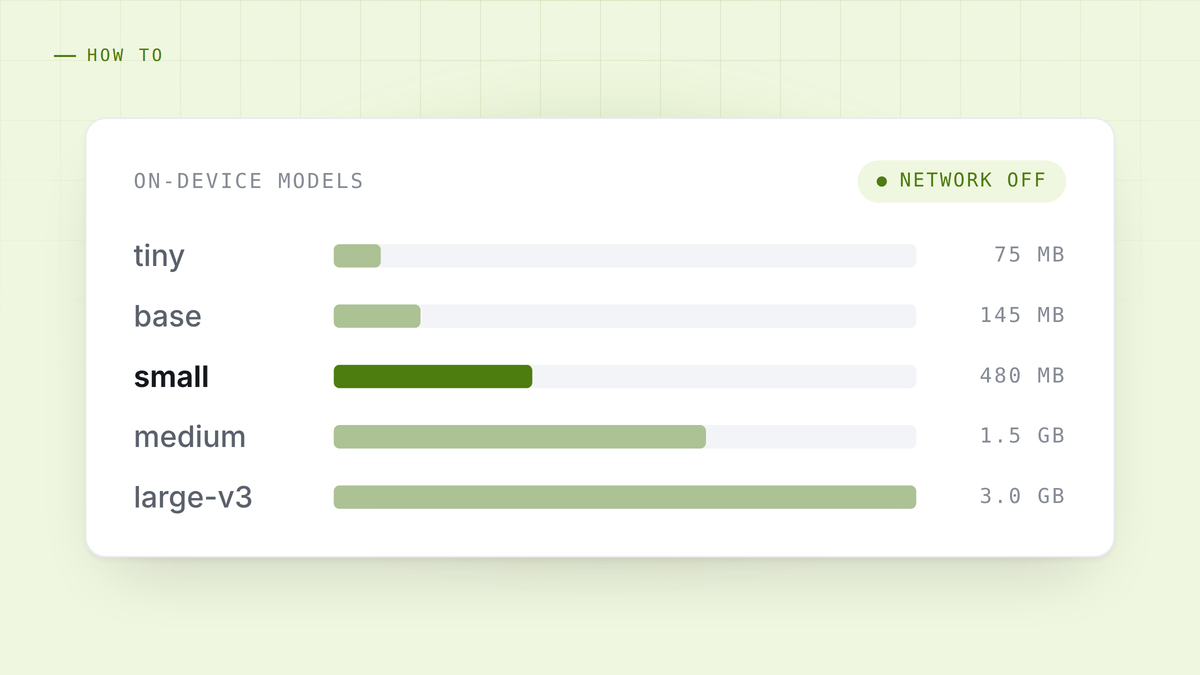
Whisper ships in sizes, and the size is the entire decision. Quantised to 4 or 5 bits, which is what any sane desktop app does:
tiny, around 75 MB. Fast enough to run live on anything. It will mangle names, acronyms and any accent it has not seen much of. Fine for a rough searchable record, not for quoting somebody back to themselves.
base, around 145 MB. The smallest size that produces a transcript you would show another person. This is a reasonable live default on an older machine.
small, around 480 MB. The point where accuracy stops being the thing you notice. Runs live comfortably on Apple silicon and on a recent Intel or AMD laptop.
medium, around 1.5 GB. Noticeably better on accents and on domain vocabulary. Too slow for live captions on most laptops, good for transcribing the recording afterwards.
large-v3, around 3 GB. The best of them, and a batch job rather than a live one unless you have a GPU.
The useful pattern is two models, not one: a small one keeping up with the call, and a larger one re-transcribing the recording afterwards when latency no longer matters. That is the split HuddleOwl uses, and there is more detail on how it is configured in the on-device models guide.
Getting the audio in the first place
This is the part people underestimate. A transcript is only as good as its input, and the two most common inputs are both bad:
A laptop microphone in a room picks up you clearly and everyone else through the speakers, mixed with the room. One track, no way to tell who said what.
A phone recorder next to the machine is the same problem with worse hardware.
What you want is both halves separately: your microphone as one track, whatever the speakers are playing as another. Then attribution is not a guess, it is a fact about which track the audio came from. Getting the second one is a permission problem on macOS and a non-problem on Windows, which is covered in recording a meeting without a bot and in more depth in the system audio guide.
What it costs your machine
Rough figures from running this daily on Apple silicon, and they are honest rather than flattering:
- small, live, quantised: about 700 MB of RAM and a fraction of one core between utterances. The fan does not come on.
- medium, transcribing an hour afterwards: about 2 GB and a few minutes of real work. The fan comes on.
- large-v3 on a laptop: slower than real time. Start it and go to lunch.
The other cost is disk. The models are downloaded once, and a machine that has collected small, medium and large is carrying about 5 GB. That is not nothing, and it is the one number people do not expect.
When local is the wrong answer
Honesty is worth more than a sales pitch here. Use a cloud model when:
You need a language local models handle badly. Whisper’s quality varies a lot by language. It is strong on English, Spanish, French, German, Italian, Portuguese and Japanese, and much weaker on lower resource languages. Test yours before committing.
The machine is old and the call is live. A 2016 Intel laptop running a model that cannot keep up produces captions that arrive after the moment has passed, which is worse than no captions.
Accuracy on names is the whole job. Cloud models with custom vocabulary can be told that your product is spelled a particular way. Local Whisper can be prompted with a vocabulary hint, and it helps, but it is not the same thing.
The reasonable position is not that local is always right. It is that local should be the default, and going to the cloud should be a decision somebody made on purpose.
The one thing to test before you trust it
Turn the wifi off and run a meeting.
That is the whole test. An app claiming on-device transcription either works with no network or it does not, and it takes one call to find out. Plenty of tools that use the words “local” and “private” in their marketing are describing where a cache lives, not where the model runs.
HuddleOwl runs whisper.cpp on your machine, takes your microphone and your system audio as separate tracks so speakers are attributed rather than guessed, and can run an entire meeting with the network off. Free, and nothing joins the call. See how it compares to the cloud notetakers.
References
- Whisper, OpenAI. The original model and paper.
- whisper.cpp, ggml. The C++ runtime most desktop apps use, including this one.
- faster-whisper, SYSTRAN. The CTranslate2 reimplementation.
- Parakeet, NVIDIA. English only, and quick.


