Most people using an AI notetaker could not say where last week’s client call currently sits. That is not carelessness. It is that the answer takes a while to find, and the tool is designed so you never have to.
Here is the actual path, and the questions that get you a straight answer.
The path a recording takes
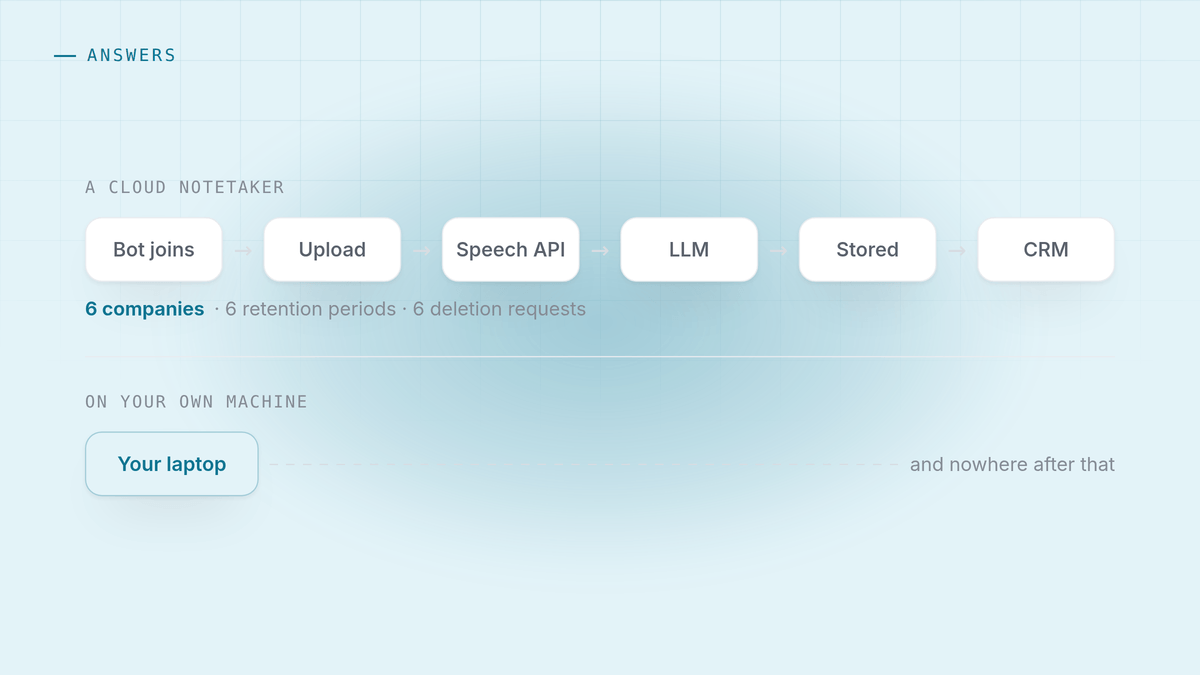
With a typical cloud notetaker, one call produces this chain:
- A bot joins the meeting and the platform streams it the audio.
- The audio is uploaded to the vendor’s infrastructure, usually a major cloud provider in a region you did not pick.
- It is transcribed, sometimes by the vendor’s own model, often by a third party speech API. That is a second company holding your audio.
- The transcript goes to a language model for the summary and the action items. Frequently a third company.
- Everything is stored so you can search it later. That is the product.
- Integrations copy it outward into your CRM, your notes app, a Slack channel.
Six steps, and each is a company, a jurisdiction and a retention period. The recording of your negotiation now exists in more places than you have ever counted.
None of that is sinister. It is what building a searchable meeting archive requires. But it is worth knowing, because the questions below become obvious once you see the chain.
The five questions worth asking
Ask these of any tool before it hears a client. The answers are usually findable, and where they are not, that is itself an answer.
1. Is the audio kept, or only the transcript? Some vendors delete the audio after transcription. Others keep it indefinitely because it is useful to them. These are very different exposures, and the difference is rarely prominent.
2. Which subprocessors touch it? A good vendor publishes a subprocessor list and commits to notifying you when it changes. If you cannot find one, you do not know who has your calls.
3. Is it used to train models? Look for the word “improve”, which frequently covers training. Look for whether opting out is available on your plan or only on the enterprise one.
4. Can you actually delete it, everywhere? Deleting a meeting from the interface and deleting it from backups, logs and the copies pushed into your CRM are different acts. Ask about the second one.
5. What happens to it if the company is acquired or closes? Customer data is an asset in an acquisition. Most privacy policies say so, in the section nobody reads.
Four sentences that should change your mind
Reading a privacy policy properly is a twenty minute job. Reading it for these four patterns is a two minute job and catches most of it.
“We may retain data for as long as necessary to provide the service.” This is a retention period of indefinite, phrased so it does not read like one.
“We use your content to improve our services.” Usually training. Sometimes human review of samples. Both may be fine. Both should be a decision rather than a discovery.
“We may transfer your information to other countries.” Fine if you are told which, and a problem if your own obligations restrict where personal data may go.
“In the event of a merger, acquisition or asset sale, your information may be transferred.” Standard, present in nearly every policy, and worth reading once so it is not a surprise later.
The alternative shape
There is a different architecture, and it changes the questions rather than answering them.
If the audio is captured on your own machine, transcribed by a model running on that machine and summarised by a model running on that machine, then steps two through six of the chain above do not exist. There is no upload, no subprocessor, no retention period, no deletion request, and nothing to hand over in an acquisition, because the vendor never had it.
That is how HuddleOwl works when the on-device engines are selected, and it is testable in about a minute: turn the wifi off and run a meeting. Transcription, live cues, the brief and the follow-up email all still work. An architecture claim you can check by pulling a cable is worth more than a paragraph in a policy.
The honest tradeoffs, because they exist:
- A local model is smaller than a frontier model. The best cloud models still write a better summary. The gap is much smaller than it was, and the app lets you use a cloud key if you want that, which is then your own key and your own account.
- There is no archive across your team. Local means the recordings are on the machine that heard them, not in a searchable company-wide library. If a shared archive is the point, local is the wrong tool and you should pick a cloud one deliberately.
- A lost laptop is a lost archive. Local files are your backup problem now.
What to do this week
If you already use a notetaker, one useful hour:
- Open its privacy policy and search for retention, subprocessor, train and acquisition. Four searches.
- Open the app and find out whether the audio is still there, or only the transcripts.
- Delete anything from a call that would embarrass you if it leaked. Not because a leak is likely, but because you will discover how hard deletion is, which is the useful part.
- Decide, on purpose, which calls belong in a cloud archive and which do not.
Most people find the split is not all or nothing. An internal standup can live anywhere. A conversation about somebody’s compensation, a candidate’s health, or a client’s unannounced acquisition probably should not leave the machine it happened on.
HuddleOwl captures both sides of a call locally, coaches you during it, and can run the whole thing with no network at all. Free, no account, nothing joins the meeting. Our own privacy page is short for the same reason.
References
- GDPR Article 28, on processors and the contracts they require.
- UK ICO guidance on data sharing.
- NIST Privacy Framework, for the vocabulary procurement teams tend to use.


