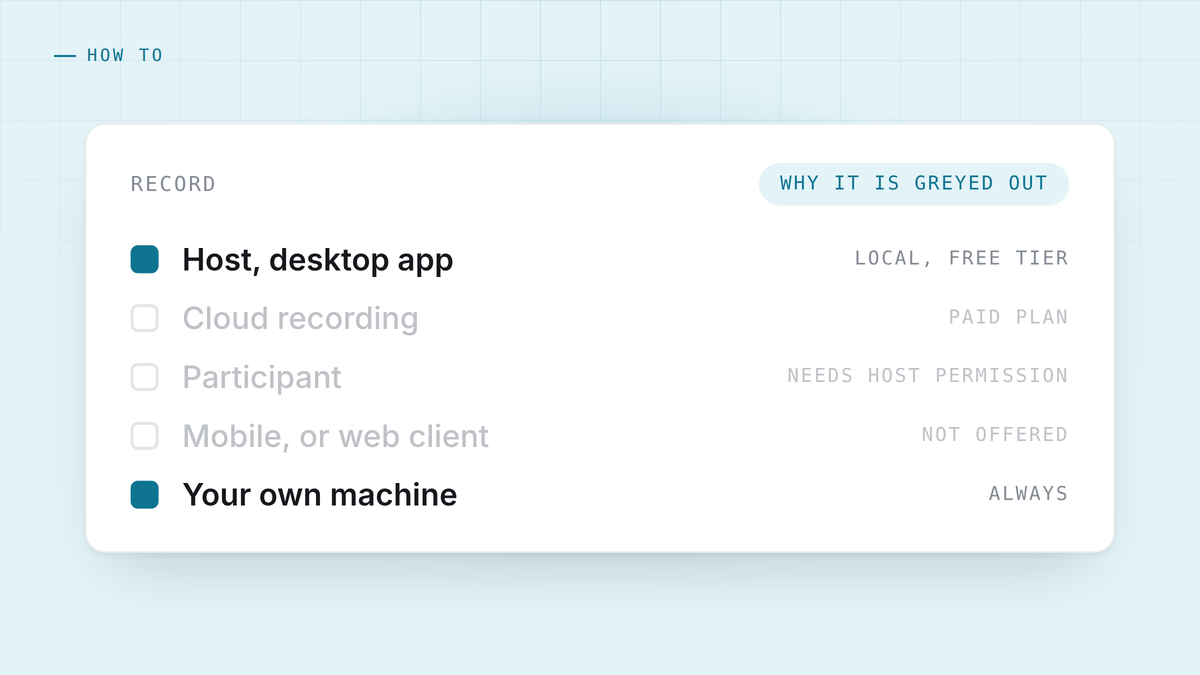
Most people looking this up have hit one of three walls: the record button is greyed out, they are not the host, or the recording they made turned out to be a video file they will never watch.
Here is what Zoom actually allows, and what to do when it does not allow it.
What Zoom itself gives you
Zoom has two kinds of recording and they are not the same product.
Local recording saves to the computer running it. It is available to hosts on the desktop app, including on the free tier, and not on mobile. You get an audio file and a video file in a folder when the meeting ends.
Cloud recording saves to Zoom’s servers and comes with a transcript and a shareable link. It is a paid feature.
The practical consequence: on a free account you can record, on your own machine, from the desktop app, if you are the host. Zoom’s plan pages move around, so check the current one linked at the bottom rather than trusting a number in any article, this one included.
Why the button is greyed out
Four reasons, in the order they actually happen.
You are not the host. A participant cannot record unless the host grants permission. The host does that from the participants list, and it has to be done in the meeting.
You are on mobile. Local recording is desktop only. On a phone the option simply is not there, which reads like a bug and is not.
An administrator turned it off. On a work account, recording is a policy setting. Your IT team can disable it for everyone, and no amount of clicking will change that from inside the meeting.
You are on the web client. The browser version is more limited than the desktop app. If recording matters, use the app.
Asking the host, in a way that works
If you are a participant, this is the whole path: ask, and they click two things.
Worth saying in the meeting rather than in chat, and worth saying why. “Would you mind enabling recording for me? I want to be present rather than typing.” Hosts nearly always say yes to that and often say no to a bare request in chat that arrives with no reason attached.
If the answer is no, that is an answer. Do not route around it.
When Zoom’s own recording is the wrong tool anyway
Even when it works, what you get is a video file of a meeting and, on paid tiers, a transcript. That is a record. It is not notes, and it is nothing at all during the call.
Three things it does not do:
It does not help you while you are talking. The recording exists so you can rewatch a call you already ran badly.
It gives you an hour of video per hour of meeting. You will not rewatch it. Almost nobody does. What you actually wanted was the four sentences that mattered.
It puts the file where Zoom decides. Cloud recordings live on Zoom’s infrastructure with Zoom’s retention policy, which is a conversation with your own compliance people waiting to happen. There is more on that in where your meeting recordings go.
Recording it yourself instead
The alternative does not need the host, does not need a plan, and does not care which platform the call is on. You capture the audio on your own machine: your microphone as one track, whatever your speakers are playing as the other.
That is the whole trick, and it is the same on Zoom, Meet, Teams, a phone call on speaker, or a conversation in a room. Nothing joins the meeting, nothing appears in the participant list, and the two tracks mean speakers are attributed by where the audio came from rather than guessed at by a model.
On Windows this needs no permission at all. On macOS it needs one system permission, and there is a specific trap in granting it that wastes an afternoon if you have not seen it before. Both are covered in recording a meeting without a bot.
This does not exempt you from telling people. Not appearing in the participant list is not the same as being secret. Say you are recording, at the top, in one sentence. Why that is the right habit regardless of where you are is in is it legal to record a meeting.
Getting a transcript out of a recording you already have
If the file already exists, whether from Zoom or from anywhere else, you do not need to send it anywhere to read it. A local speech model will transcribe an hour of audio on a laptop in a few minutes, and HuddleOwl will import an audio file and run the same brief over it as a live call. The sizes, speeds and memory costs are in how to transcribe a meeting on your own machine.
The short version
- Host, desktop, free account: Zoom’s local recording works. Use it if you want a file.
- Participant: ask the host. They can grant it in one click, in the meeting.
- Greyed out and the host cannot help: it is an admin policy. Capture it on your own machine instead.
- You want notes rather than a video: none of Zoom’s recording options are that. Capture locally and transcribe locally.
HuddleOwl captures both sides of a Zoom, Meet or Teams call from your own machine, needs no host permission and no plan, coaches you while the call is running and scores it afterwards. Free, and nothing joins the meeting.
References
- Zoom: local recording.
- Zoom: cloud recording.
- Zoom plans and pricing, for what the current tiers include.


